Skip to content
vidcli
Learning videos in 100 languages

Turn any video into content that teaches

Paste a YouTube link or upload a file. Vidcli writes synced subtitles with translation, cuts vertical clips and posts them to your channels.

Or upload a video fileFree planNo credit card needed
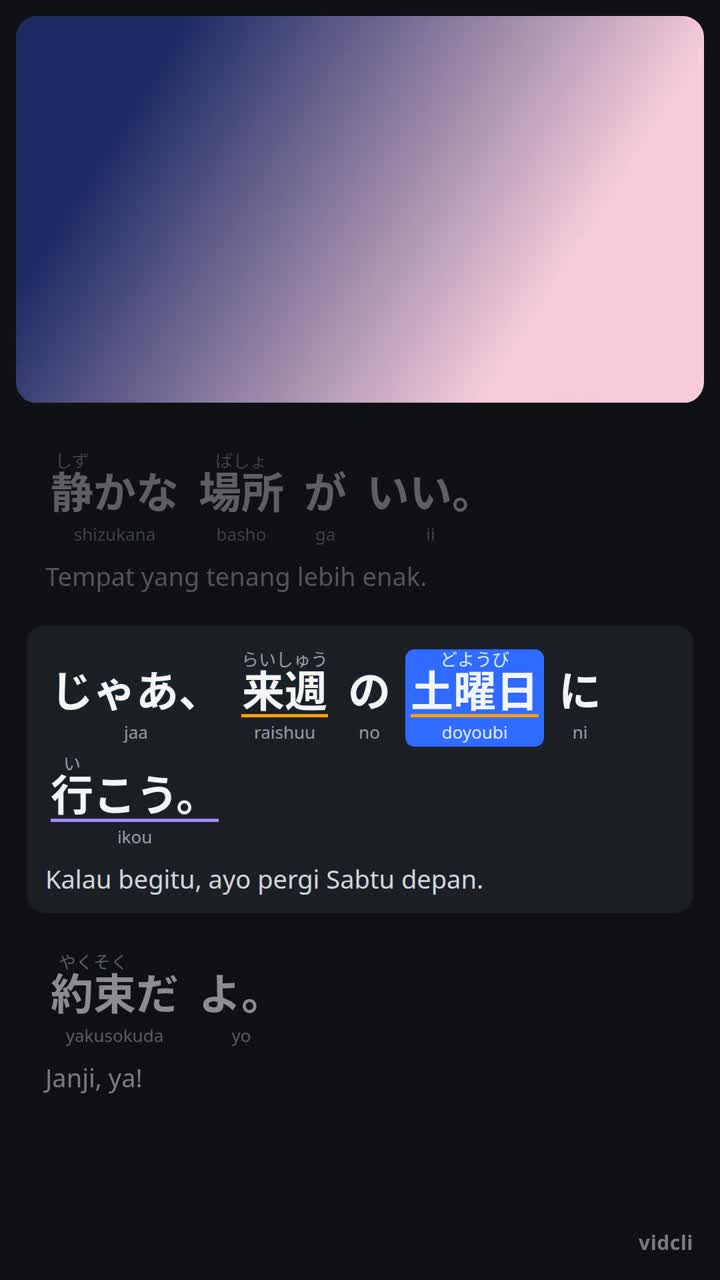
A Vidcli learning video frame: Japanese subtitles with furigana, romaji and an Indonesian translation, the spoken word highlighted
A real frame rendered by Vidcli

Publish and schedule to

  • YouTube
  • TikTok
  • Instagram
  • Facebook
  • Threads
  • X
  • LinkedIn

How it works

  1. 1

    Paste a link or upload

    Start from a YouTube video you have the rights to use, or a file from your device.

  2. 2

    AI does the first draft

    Transcript, translation and subtitles are ready in minutes. Fix any line in the editor.

  3. 3

    Export or publish

    Download the MP4 or send it to your connected channels, now or on a schedule.

One workspace, from raw video to posted

Make the video, cut the clips, publish them and see how they do — without switching tools.

Learning Video

Explainer and learning videos with subtitles that teach

Every spoken word is highlighted in time, with the reading above it and a translation under each line.

  • Speech in 100 languages, translated into any of them
  • Furigana and romaji for Japanese, pinyin for Chinese, transliteration for other scripts
  • Edit words, readings and translations before you export

Auto Clipper

One long video, many vertical clips

Vidcli finds the strongest moments and cuts them into 9:16 clips for Shorts, Reels and TikTok.

  • Face tracking keeps the speaker in frame, with split layouts for two people
  • Animated captions burned in, optional silence removal
  • Trim each clip by hand when you want full control

Publisher & scheduler

Post everywhere from one place

Connect your accounts once, then publish or schedule the same video to several platforms through their official APIs.

  • YouTube, Facebook Pages, Instagram, TikTok, Threads, LinkedIn and X
  • Schedule posts in your own time zone
  • Captions checked against each platform's length limit

Analytics

Creator plan and up

See what's working on your channels

Views, watch time, subscribers and likes from YouTube and Facebook Pages, read straight from the platforms, in one dashboard.

See plansYouTube · Facebook
  • Views
  • Watch time
  • Subscribers
  • Likes

Start free, upgrade when you grow

1 credit = 1 started minute of processed video. Edits and exports don't use credits.

Compare plans

Questions

Is Vidcli free?

Yes. The Free plan gives you monthly credits to try every tool, with no credit card. Free exports carry a small Vidcli watermark; paid plans remove it.

What is a credit?

One credit is one started minute of video that Vidcli processes. Editing and exporting again are free.

Can I start from a YouTube link?

Yes — paste the link of a video you have the rights to use. If it is longer than your plan allows, Vidcli uses the first part.

Which platforms can I publish to?

YouTube, Facebook Pages, Instagram, TikTok, Threads, LinkedIn and X, through each platform's official API.

Which plan includes analytics?

Analytics for YouTube and Facebook Pages is included from the Creator plan up.

Which languages are supported?

Videos can be in any of 100 spoken languages and translated into any of them. The app itself is available in English, Indonesian, Japanese, Spanish, Portuguese and Vietnamese.

What if I run out of credits?

On a paid plan you can buy a credit top-up at any time. Top-up credits never expire and are used after your monthly plan credits. Agency teams can also add extra seats per month.

Make your first video today

Paste a link, sign up, and see the result in a few minutes.

Free plan · No credit card needed